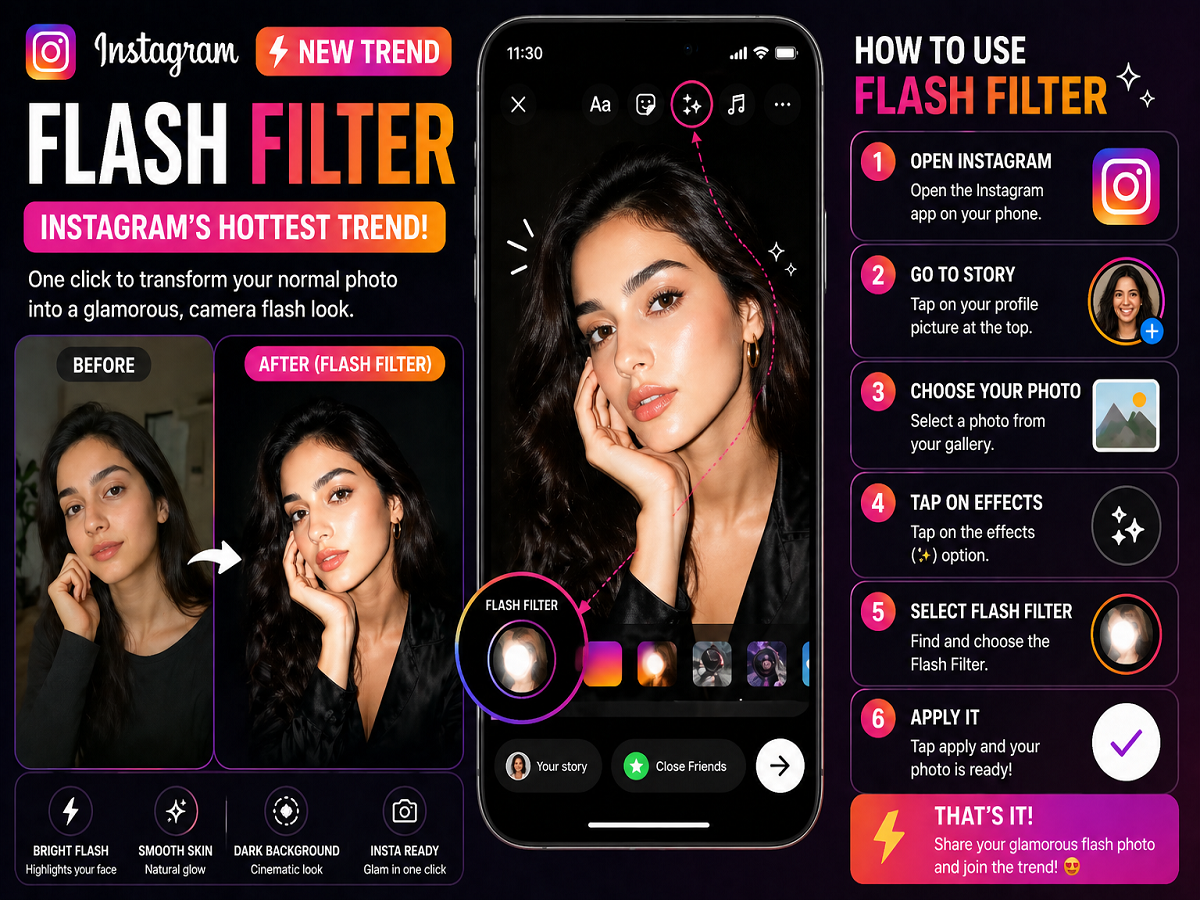
A new photo trend is taking over Instagram, and chances are you’ve already seen it flooding your feed. The Flash Filter trend has quickly become one of the most popular effects on the platform, turning ordinary photos into high-end, glamorous shots with just a single tap.
From influencers to casual users, everyone seems to be experimenting with this eye-catching filter. If you’ve been wondering how to create these stunning photos yourself, here’s everything you need to know.
What Is the Instagram Flash Filter Trend?
The Flash Filter is a visual effect that mimics the look of professional flash photography. It brightens your face with a sharp light effect while subtly darkening the background, creating a dramatic contrast.
This effect gives photos a studio-like finish, making skin appear smoother and facial features more defined. The result is a polished, premium look that stands out instantly on social media.
Why Is This Trend So Popular?
The growing popularity of the Flash Filter comes down to its simplicity and visual appeal. Unlike complex editing tools, this filter delivers impressive results within seconds.
Here’s why users are loving it:
- Instant glow-up without heavy editing
- Smooth skin effect that enhances facial features
- Darkened background for a cinematic look
- Perfect for selfies and portraits
- No advanced skills required
In a world where quick and attractive content performs best, this filter ticks all the right boxes.
Step-by-Step: How to Use the Flash Filter on Instagram
If you want to join the trend, follow these simple steps:
Step 1: Open Instagram
Launch the Instagram app on your smartphone.
Step 2: Go to Story Mode
Tap on your profile picture at the top to open the Story camera.
Step 3: Select Your Photo
Choose a photo from your gallery that you want to edit using the Flash Filter.
Step 4: Tap on Effects
Look for the Effects or filter option available on the screen.
Step 5: Find the Flash Filter
Scroll through the available filters and select the Flash Filter.
Step 6: Apply the Effect
Tap on apply, and within seconds your image will transform into a stylish, high-contrast photo.
Pro Tips to Get the Best Results
To make your Flash Filter photos stand out even more, keep these tips in mind:
- Use well-lit original photos for better results
- Choose images with a clear face focus
- Avoid overly cluttered backgrounds
- Slightly adjust brightness or contrast if needed
These small tweaks can make a big difference in the final output.
A New Era of Quick Photo Editing
Instagram trends evolve rapidly, but the Flash Filter stands out because of its ease of use and professional finish. It reflects a broader shift toward quick, high-impact editing tools that anyone can use.
As users continue to seek creative yet simple ways to enhance their content, filters like this are likely to remain popular.
Final Thoughts
The Instagram Flash Filter trend proves that you don’t need advanced editing skills to create stunning photos. With just a few taps, you can transform a basic image into a glamorous, social media-ready shot.
So if your feed is filled with glowing portraits and dramatic lighting effects, now you know the secret—and how to try it yourself.