WhatsApp Account Ban 2026: Imagine opening WhatsApp to send an important message and suddenly discovering that your account is no longer allowed to use the platform. Such an unexpected restriction can create difficulties, particularly for people who depend on the messaging application for personal conversations, business communication, document sharing and everyday activities.
WhatsApp has established rules and automated security systems designed to identify spam, suspicious behaviour, scams and other activities that may compromise user safety. Accounts that violate these policies can face temporary restrictions or permanent bans, depending on the circumstances.
However, not every account restriction means that the user has intentionally broken the rules. Automated systems can sometimes make mistakes, and WhatsApp provides a review process for users who believe their accounts have been banned incorrectly.
Here is everything you should know about the most common reasons behind WhatsApp account bans, how to avoid restrictions and what steps you can take to regain access.
Why Does WhatsApp Restrict or Ban User Accounts?
WhatsApp is used by individuals, businesses and organisations to exchange information quickly. To maintain a safer messaging environment, the platform monitors certain patterns of activity that may indicate misuse.
These can include sending unsolicited messages, using unauthorised software, engaging in fraudulent behaviour or repeatedly contacting people who do not want to receive messages.
When suspicious activity is detected, WhatsApp may restrict an account while evaluating whether it complies with the platform's terms and messaging policies.
The type and duration of the restriction can vary according to the nature of the suspected violation.
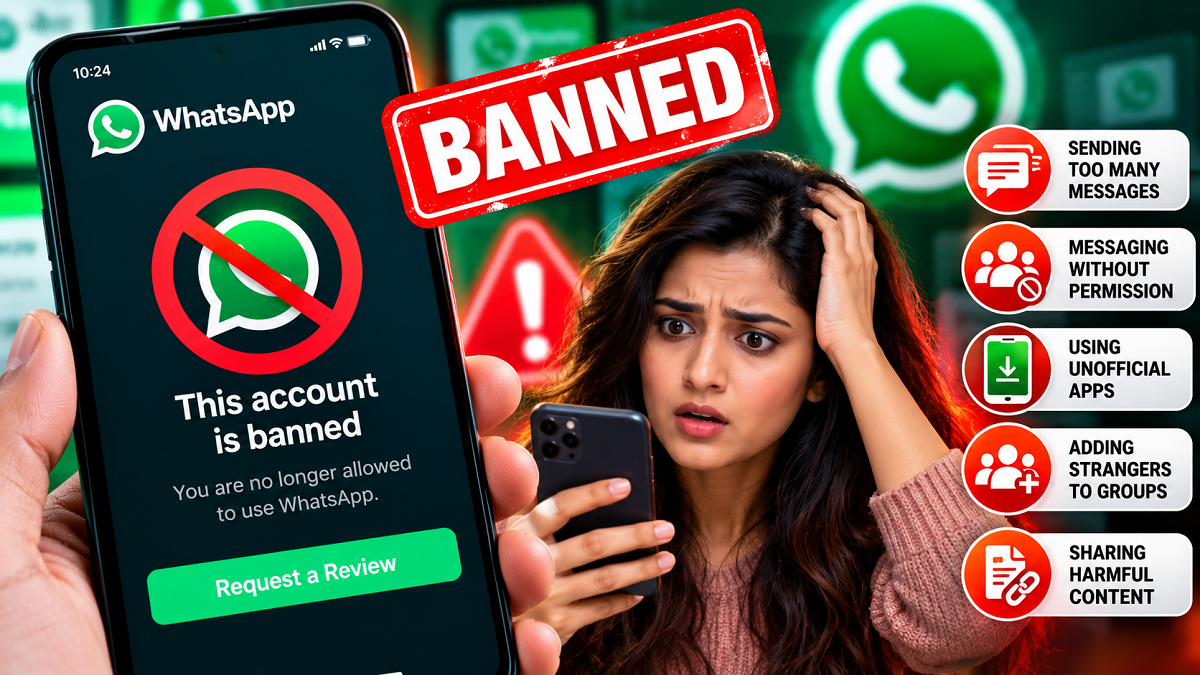
1. Sending Too Many Messages in a Short Period
One common reason for WhatsApp account restrictions is behaviour that resembles spam.
For example, repeatedly sending identical messages to numerous recipients within a short period may raise concerns, particularly when the recipients have not requested the information.
This can happen when individuals or businesses use WhatsApp to distribute advertisements, promotional offers or bulk messages without proper permission.
WhatsApp does not publicly disclose a universal message limit that automatically triggers a ban for every account.
Instead, enforcement can depend on several factors, including messaging patterns, user complaints and other indicators of suspicious activity.
How to avoid problems: Send messages primarily to people who expect to hear from you. Businesses should use authorised WhatsApp Business features and follow the platform's messaging requirements.
2. Repeatedly Contacting People Without Their Consent
Messaging unfamiliar numbers without permission can also put a WhatsApp account at risk.
When someone receives unwanted messages, they may block or report the sender. Repeated complaints can contribute to enforcement action against the reported account.
This is particularly relevant to users who collect phone numbers from public websites, online directories or social media platforms and then send unsolicited promotional messages.
Even if the content appears harmless, contacting people who have not agreed to receive communications can create problems.
How to avoid problems: Obtain permission before sending marketing messages, respect requests to stop communication and avoid repeatedly contacting people who have not responded.
3. Installing Modified WhatsApp Applications
Another important reason for account restrictions is the use of unofficial versions of WhatsApp.
Applications such as GBWhatsApp and YoWhatsApp are modified alternatives that are not developed or authorised by WhatsApp.
Although these applications may advertise additional customisation or privacy features, they can create security concerns and may violate WhatsApp's terms of service.
Because modified applications are not maintained by the official WhatsApp development team, users cannot rely on the same assurances about security updates, privacy protections and application integrity.
WhatsApp may temporarily or permanently restrict accounts associated with unsupported applications.
How to avoid problems: Download WhatsApp Messenger or WhatsApp Business only through official sources, including recognised app stores and the official WhatsApp website.
4. Adding People to WhatsApp Groups Without Permission
WhatsApp groups are useful for families, workplaces, schools and community organisations. However, adding people to groups without their knowledge can lead to complaints.
Some users may not want to participate in promotional, political, commercial or unfamiliar discussion groups.
If a person repeatedly adds unwilling participants to groups, those participants may report the activity.
Such complaints, particularly when combined with other suspicious behaviour, can contribute to account restrictions.
How to avoid problems: Ask people before including them in groups. Where appropriate, share a group invitation link so recipients can decide whether they want to join.
Users can also control who is allowed to add them to groups through WhatsApp's privacy settings.
5. Sharing Harmful Content or Using Unauthorised Automation Tools
WhatsApp also takes action against accounts involved in activities that violate its policies.
Examples can include impersonating another person, attempting financial fraud, sending threatening messages, harassing other users or distributing content prohibited under the platform's rules.
Unauthorised automation tools, scripts and bots can also create enforcement risks, especially when used to send unsolicited messages at scale.
Businesses using WhatsApp for customer communication should rely on officially supported solutions rather than unapproved bulk-messaging software.
How to avoid problems: Follow WhatsApp's terms of service, avoid deceptive content and use only approved tools for business messaging.
What Should You Do If WhatsApp Has Banned Your Account?
If WhatsApp displays a message indicating that your account can no longer use the service, you may be able to request a review.
The available options can depend on the type of restriction and the version of the application.
Follow these steps:
- Open the official WhatsApp application on your smartphone.
- Read the account restriction message carefully.
- Look for the Request a Review option, if available.
- Follow the on-screen instructions to submit your appeal.
- Explain briefly why you believe the restriction was incorrect.
- Wait for WhatsApp to communicate the outcome of the review.
Submitting a review request does not guarantee that your account will be restored.
If the restriction was imposed because of an actual policy violation, WhatsApp may decide to maintain the ban.
Temporary vs Permanent WhatsApp Ban: What Is the Difference?
WhatsApp restrictions can affect accounts in different ways.
| Temporary restriction | Permanent ban |
|---|---|
| May last for a limited period | May prevent continued use of the account |
| Sometimes associated with unsupported apps or suspicious activity | May follow serious or repeated policy violations |
| May display a countdown or warning | May display an account-ban notification |
| Access may return after the issue is resolved | Restoration generally depends on a successful review |
The exact restriction applied to an account depends on WhatsApp's enforcement decision.
Users should avoid attempting to bypass restrictions through unofficial software or misleading account information.
How to Protect Your WhatsApp Account From Future Restrictions
Maintaining a secure and compliant WhatsApp account does not require complicated technical knowledge.
Start by keeping the official application updated and avoiding modified versions downloaded from unfamiliar websites.
Use two-step verification to strengthen account security and never share your registration code or PIN with another person.
If you operate a business, communicate with customers who have agreed to receive messages and provide a straightforward way for them to stop promotional communication.
Review your group messaging habits, avoid forwarding suspicious content and refrain from using unauthorised tools that promise unlimited bulk messaging.
These precautions can reduce the likelihood of account restrictions while also improving your overall digital safety.
Has WhatsApp Been Banned for Everyone?
An individual account ban should not be confused with a nationwide ban or a widespread WhatsApp service outage.
If your account displays a restriction message while other users can access the platform normally, the issue may relate specifically to your account.
The source report does not indicate that WhatsApp has been banned across India. Instead, it explains circumstances in which individual users may lose access because of suspected policy violations.
Users experiencing problems should first identify whether they are facing an account restriction, an internet connectivity issue or a temporary service disruption.
Final Word
WhatsApp account bans can interrupt personal conversations and important professional activities, but understanding the platform's rules can help users avoid preventable problems.
Sending unwanted bulk messages, contacting strangers without consent, installing unofficial WhatsApp applications, adding people to groups indiscriminately and using unauthorised automation tools are among the behaviours that may lead to restrictions.
If your account has been banned unexpectedly, use the official review process rather than relying on third-party services promising instant restoration.
Following WhatsApp's policies, respecting other users' privacy and maintaining good account security practices remain the most reliable ways to protect your access to the messaging platform.