WhatsApp Privacy Tips 2026: WhatsApp has become an essential communication platform for millions of people who use it to stay connected with family, friends, colleagues and business contacts. However, when someone suddenly stops responding or their profile information disappears, users may begin wondering whether they have been blocked.
The situation can be confusing because WhatsApp does not send notifications when one user blocks another. This privacy-focused approach is designed to protect users and prevent unwanted contact.
Although there is no official feature that directly reveals whether someone has blocked your number, certain changes in their WhatsApp profile and activity may provide clues.
Interestingly, some of these indicators can be checked without sending a message or making a phone call.
However, it is important to understand that none of these signs provides absolute confirmation. Privacy settings, internet connectivity and account changes can produce similar results.
Here are the main indicators users should understand before drawing conclusions.
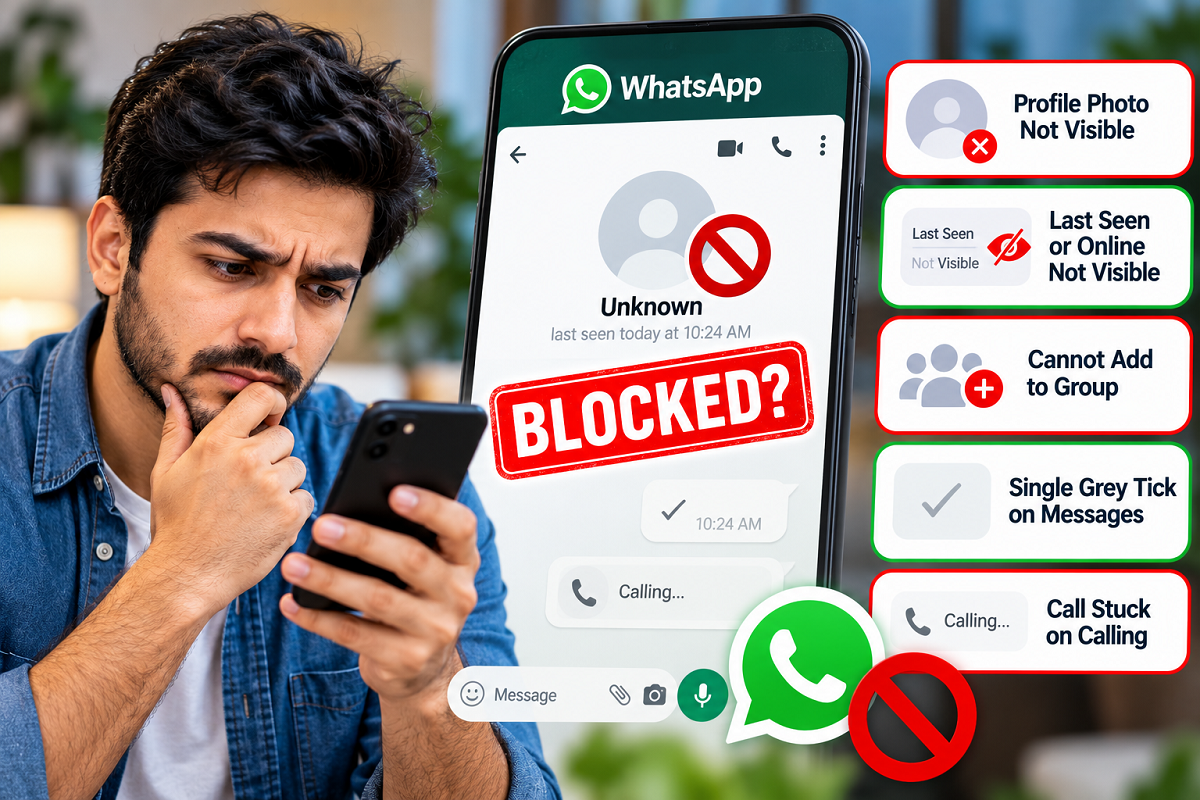
1. Check Whether Their WhatsApp Profile Picture Is Still Visible
One of the simplest ways to look for a possible blocking indicator is to open the person's WhatsApp conversation and examine their profile picture.
If someone previously displayed a profile photograph and it suddenly disappears or stops updating for you, this may raise questions.
WhatsApp generally prevents blocked contacts from seeing updates to the blocking user's profile photo.
However, a missing photograph does not necessarily mean your number has been blocked.
The person may have removed their picture, changed their privacy preferences or restricted photo visibility to selected contacts.
For example, WhatsApp allows users to decide whether their profile picture is visible to everyone, their contacts, selected contacts or nobody.
Therefore, changes in profile picture visibility should be considered only one possible indicator rather than definitive evidence.
Important: A disappearing or unchanged profile picture cannot independently confirm that someone has blocked you.
2. Look for Changes in Last Seen and Online Visibility
Another commonly discussed clue involves WhatsApp's Last Seen and Online features.
Last Seen generally indicates when a person last used WhatsApp, while Online shows when they are actively using the application with an internet connection.
If you previously had access to someone's activity information but can no longer see it, blocking is one possible explanation.
However, WhatsApp provides several privacy controls that allow users to hide their activity from specific people or everyone.
A person can also change who sees their online presence.
Additionally, WhatsApp's privacy rules may prevent you from viewing another person's Last Seen information when you have restricted your own visibility.
As a result, the absence of Last Seen or Online information does not prove that a contact has blocked you.
Important: Privacy settings can make someone's WhatsApp activity invisible even when they have not blocked your number.
3. Understand What Happens When You Try to Add Someone to a Group
Some users attempt to identify possible blocking by adding a contact to a WhatsApp group.
If WhatsApp prevents the person from being added directly, they may assume they have been blocked.
However, this approach has important limitations.
WhatsApp offers group privacy settings that allow individuals to control who can add them to groups.
For example, a person may permit only saved contacts or exclude particular users from adding them.
When direct group addition is restricted, WhatsApp may offer an invitation option instead.
Therefore, an unsuccessful group-add attempt does not automatically establish that blocking has occurred.
It is also worth remembering that attempting to add someone to a group is an active interaction and may generate an invitation or notification.
For users who want to check possible blocking without contacting the other person, simply reviewing existing profile information is less intrusive.
Important: Group restrictions can result from privacy preferences rather than blocking.
4. What Does a Single Grey Tick Mean on WhatsApp?
WhatsApp uses message check marks to indicate delivery and reading status.
Understanding these symbols can help users interpret communication problems more accurately.
| WhatsApp Indicator | Meaning |
|---|---|
| One grey tick | Message successfully sent but not yet delivered to the recipient's device |
| Two grey ticks | Message delivered |
| Two blue ticks | Message read, when read receipts are enabled and applicable |
If a message remains marked with one grey tick for an extended period, it could indicate that the recipient has blocked the sender.
However, several other explanations are possible.
The recipient may have switched off their phone, lost internet access, stopped using WhatsApp or experienced a temporary connectivity problem.
Consequently, a single grey tick should never be treated as conclusive evidence of blocking.
This method also requires sending a message, so it is not suitable for someone who wants to check without initiating contact.
5. Can WhatsApp Calls Reveal Whether Someone Has Blocked You?
WhatsApp voice and video calls may provide additional clues, but they are not reliable confirmation tools.
When a call fails to connect or remains on the Calling screen without progressing to Ringing, some users suspect that the recipient has blocked them.
However, failed calls can occur for several technical reasons, including unstable internet connections, unavailable devices and application-related problems.
A person may also be unable to receive calls because of network conditions or device settings.
Therefore, unsuccessful WhatsApp calls should not automatically be interpreted as evidence of blocking.
Importantly, checking through a call means actively attempting to contact the other person, which may not be appropriate if they have chosen to limit communication.
Does WhatsApp Offer an Official Feature to Confirm Blocking?
WhatsApp does not provide a dedicated tool or notification that tells users exactly who has blocked them.
The platform deliberately keeps blocking information ambiguous to protect individual privacy.
This means users cannot reliably establish blocking simply by examining profile photographs, activity indicators or message delivery status.
Even when several signs appear together, they should be treated as suggestive rather than definitive.
Users should also be cautious about websites or third-party applications claiming to reveal a complete list of people who have blocked them.
Such services may request unnecessary permissions, collect personal information or expose accounts to security risks.
WhatsApp does not provide a standard public feature that allows outside applications to retrieve an authoritative list of users who have blocked an account.
What Should You Do If You Suspect Someone Has Blocked You?
If someone appears to have stopped communicating, the most sensible approach is to avoid making immediate assumptions.
The person may be busy, taking a break from social media, changing privacy settings or dealing with connectivity issues.
If communication is genuinely important, consider whether there is an appropriate, previously established way to contact them.
However, repeatedly calling, creating alternative accounts or attempting to bypass a suspected block can violate another person's boundaries.
Respecting privacy remains important, regardless of whether blocking has actually occurred.
Final Thoughts
WhatsApp offers several indirect clues that may help users understand why a contact's profile information or activity is no longer visible.
A missing profile photograph, hidden Last Seen information, group-add restrictions and undelivered messages may raise suspicion, but each has alternative explanations.
The key takeaway is that WhatsApp does not offer a guaranteed way to confirm that someone has blocked you, particularly without sending a message or making a call.
Rather than relying on assumptions or unverified third-party tools, users should understand WhatsApp's privacy features and respect the communication choices of others.