WhatsApp has continued to evolve beyond simple text messaging, and one of its most engaging additions in recent years is the emoji reaction feature. Introduced to make conversations more expressive and less cluttered, this feature allows users to respond to messages instantly without sending a separate reply. Whether you are chatting with friends, family, or colleagues, emoji reactions add a new layer of emotion and clarity to everyday conversations.
Inspired by similar features on platforms like Facebook, Instagram, and Messenger, WhatsApp message reactions are now fully available for both individual and group chats. With just a tap, users can acknowledge messages, show appreciation, or express emotions in a quick and subtle way.
What Are WhatsApp Emoji Reactions?
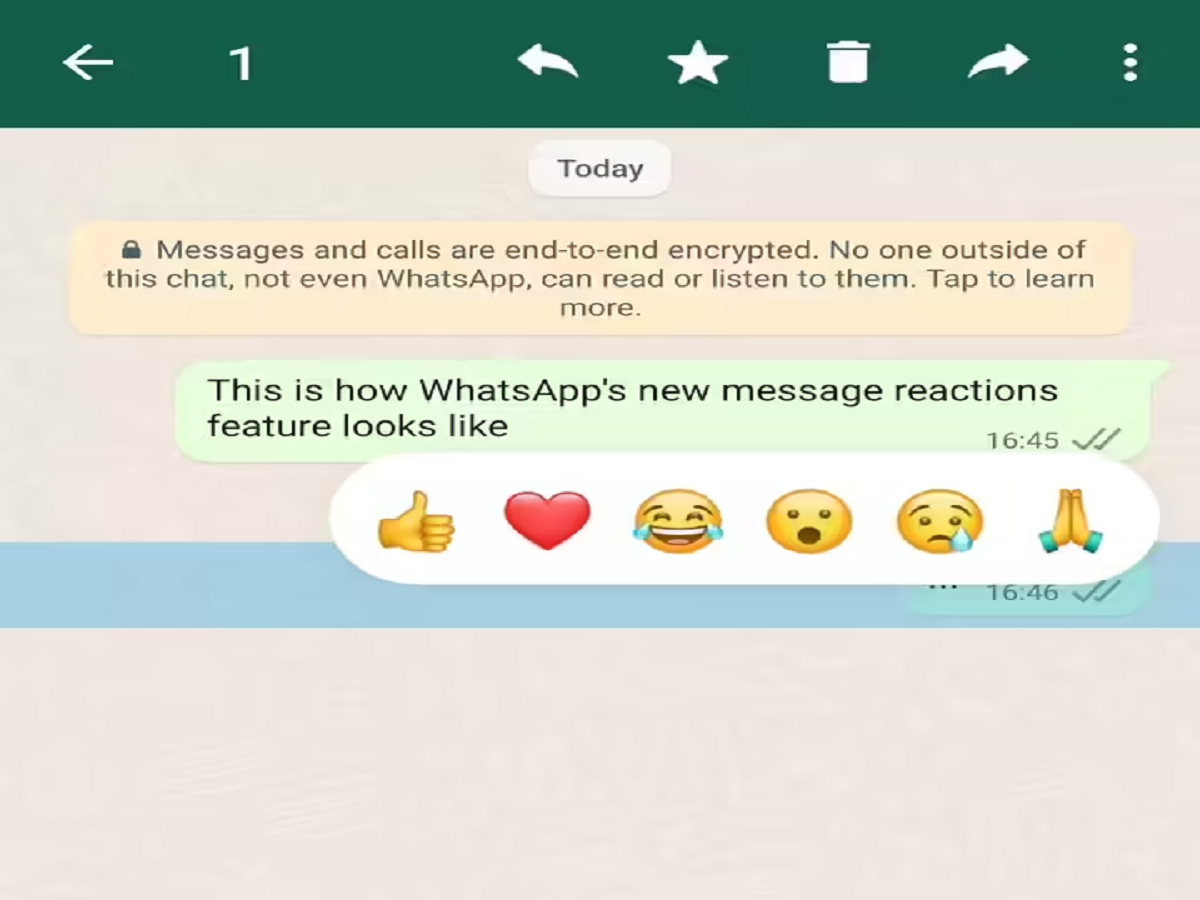
Emoji reactions on WhatsApp let users respond to a message by attaching an emoji directly to it. Instead of typing “Okay,” “Nice,” or “Sad,” you can now react visually—saving time and reducing unnecessary messages in busy chats.
Currently, WhatsApp offers a set of commonly used emojis for reactions, including:
- Thumbs Up
- Red Heart
- Face with Tears of Joy
- Surprised Face
- Crying Face
- Folded Hands
These reactions are visible to everyone in the chat and can be used on both sent and received messages.
Why Emoji Reactions Are Useful
Emoji reactions are especially helpful in group conversations where multiple people are involved. Instead of flooding the chat with short replies, reactions keep conversations clean and organized.
Key benefits include:
- Faster responses without typing
- Clear emotional expression
- Reduced message clutter in groups
- Better engagement in conversations
- Easy acknowledgment of messages
From reacting to a funny joke to confirming you’ve read an important update, emoji reactions make communication smoother and more intuitive.
How to React to WhatsApp Messages Using Emojis
Using emoji reactions on WhatsApp is simple and works on both Android and iOS devices. However, you must ensure that you are using the latest version of the app.
Follow these steps to react to a message:
- Update WhatsApp from the Google Play Store or Apple App Store.
- Open the WhatsApp app on your phone.
- Go to any individual chat or group conversation.
- Tap and hold on the message you want to react to.
- A small pop-up menu with emoji options will appear.
- Select the emoji that best matches your reaction.
Once selected, the emoji will appear below the message, visible to all participants in the chat.
Things to Know About WhatsApp Reactions
- You can react to both text and media messages.
- Reactions can be changed by tapping and holding the message again and choosing a different emoji.
- If multiple users react to the same message, all reactions are displayed.
- Reactions are synced across devices linked to the same WhatsApp account.
- Emoji reactions work in private chats as well as group chats.
How Emoji Reactions Improve Digital Communication
In modern messaging, speed and clarity matter. Emoji reactions allow users to communicate emotions instantly without disrupting the flow of conversation. They are especially useful for professional groups, family chats, and large communities where short confirmations are common.
As WhatsApp continues to roll out user-focused updates, emoji reactions highlight the platform’s effort to make conversations more expressive, efficient, and enjoyable.
Emoji reactions on WhatsApp may seem like a small feature, but they significantly enhance how users interact within chats. By allowing quick, expressive responses, WhatsApp has made conversations more dynamic and user-friendly. If you haven’t tried message reactions yet, updating your app and exploring this feature can make your daily chats more engaging than ever.