App Update Tips: Do you often see an app update notification and postpone it because everything seems to be working fine? App updates are not released only to introduce new features or change the design. They can also fix bugs, improve compatibility and, most importantly, patch security vulnerabilities that could otherwise put your data at risk.
Smartphones have become central to everyday life. We use apps for banking, UPI payments, shopping, social media, work, entertainment and communication. That also means some apps may contain sensitive information or have access to important functions on your device.
Keeping important apps updated is therefore one of the simplest ways to improve your phone's security and reliability.
What Exactly Is an App Update?
An app update is a newer version of an application released by its developer.
After an app is launched, developers continue monitoring its performance. Users may report problems, security researchers may discover vulnerabilities, or changes to Android and iOS may require modifications to keep the app working correctly.
Developers can address these issues through subsequent updates.
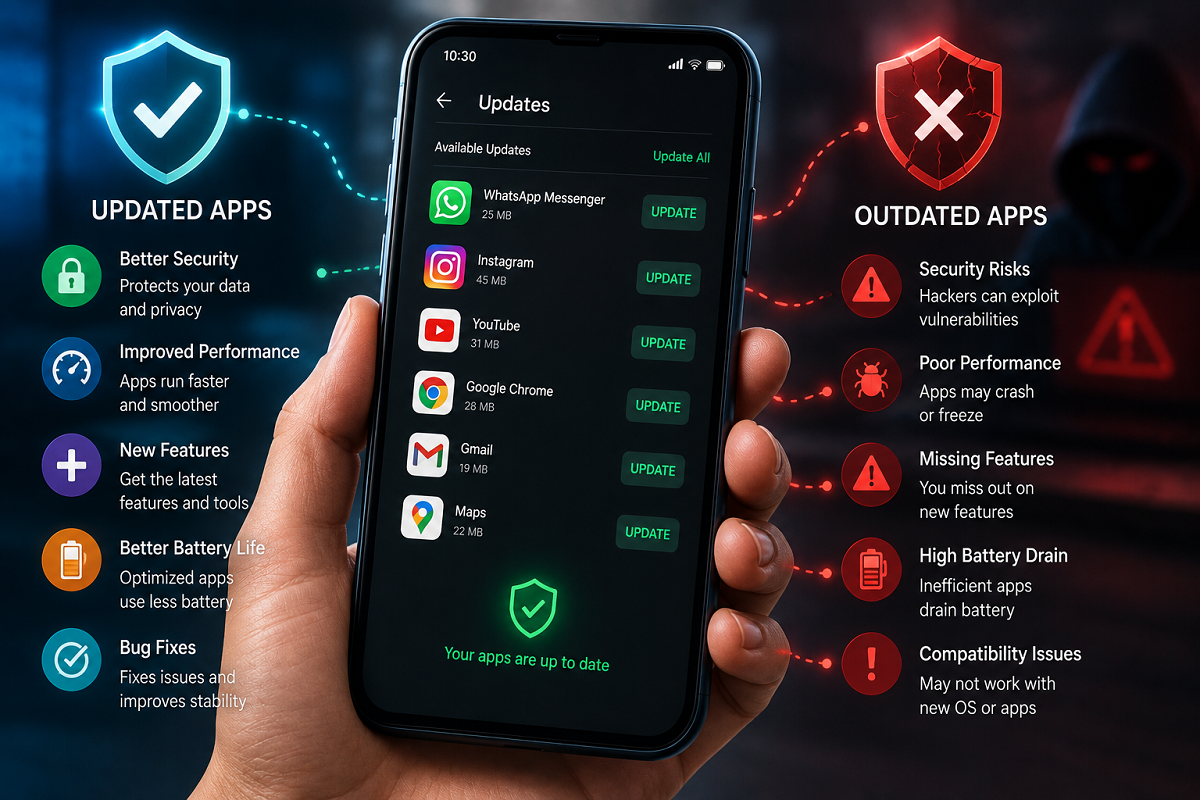
An update may include security patches, bug fixes, performance improvements, compatibility changes, interface improvements or entirely new features.
This is why an app that looks almost identical after an update may still have received important changes behind the scenes.
1. Updates Can Fix Security Vulnerabilities
Security is one of the strongest reasons to keep applications updated.
Software can contain vulnerabilities that are discovered after an app has already been installed on millions of devices.
Once developers identify such a weakness, they may release a security patch through an app update.
If you continue using an older version, that vulnerability may remain on your device even though a fix is already available.
This doesn't mean every outdated app will automatically be hacked, but delaying important security updates can unnecessarily increase exposure to known risks.
2. Bugs and Crashes Can Be Fixed
Have you ever experienced an app suddenly closing, freezing on one screen or refusing to load a particular feature?
Such problems can sometimes be caused by software bugs.
Developers regularly use updates to correct known problems. After installing an update, users may notice fewer crashes, smoother navigation or fixes for features that previously did not work correctly.
However, an update does not guarantee better performance in every case. Occasionally, a new version can introduce its own bugs, which developers may subsequently correct with another update.
3. Apps May Work Better With Your Phone's Operating System
Your phone's operating system also receives updates.
As Android and Apple iOS evolve, app developers may need to modify their applications to maintain compatibility.
An outdated app may eventually experience problems with notifications, permissions, authentication or other functions after major operating-system changes.
Keeping both your operating system and important applications reasonably current can reduce compatibility issues.
4. New Features May Arrive Through Updates
The most visible benefit of an app update is often a new feature.
A messaging app may introduce additional privacy controls, a banking app may receive a redesigned payment interface, or a photo application may introduce new editing tools.
Some features are activated remotely and therefore don't always require an app update. However, developers frequently require users to install a newer app version before certain features become available.
If your friend has a new feature that doesn't appear on your phone, checking for an app update is one of the first things worth trying.
5. Older Versions May Eventually Stop Working
Developers cannot always support every version of an application indefinitely.
Older versions may eventually lose compatibility with the company's servers or authentication systems. In some cases, the app may display a message requiring an update before you can continue using it.
This can be particularly inconvenient with essential apps such as banking, payments, authentication, communication and work applications.
Updating them regularly reduces the chance of discovering at an inconvenient moment that an old version is no longer supported.
Which Apps Should You Update First?
If you don't want to update every application immediately, prioritise apps that handle sensitive information or connect frequently to online services.
Banking and payment apps, email, browsers, messaging apps, password managers, authentication apps, social-media platforms and cloud-storage services should generally be high on the priority list.
Security updates for your phone's operating system are equally important.
Should You Turn On Automatic App Updates?
For many users, automatic updates are the easiest solution.
On Android devices, automatic app updates can be managed through the Google Play Store. On iPhones, automatic app updates can be controlled through Apple's App Store settings.
Users concerned about mobile-data consumption can configure updates to download when connected to Wi-Fi, depending on the options available on their device.
Automatic updates are particularly useful for people who tend to ignore update notifications for weeks or months.
Don't Download Updates From Random Websites
Keeping apps updated is important, but where you obtain the update matters just as much.
If an app displays an unexpected pop-up asking you to download an APK or update file from an unknown website, don't install it simply because it claims to be a "security update."
For most users, the safest approach is to update applications through the official app store or another source explicitly authorised by the app developer.
Fake app updates are sometimes used to distribute malware or steal login information.
Updating Apps Is a Small but Important Security Habit
You don't need to install every update the second it appears. But repeatedly ignoring updates—especially for banking, payments, browsers, messaging and other internet-connected applications—isn't a good long-term practice.
App updates can patch security vulnerabilities, fix bugs, improve stability, maintain compatibility and provide new features.
So the next time your phone shows an update notification, don't assume it is merely a cosmetic change. That small download may contain an important security fix designed to protect the app—and potentially the information you access through it.