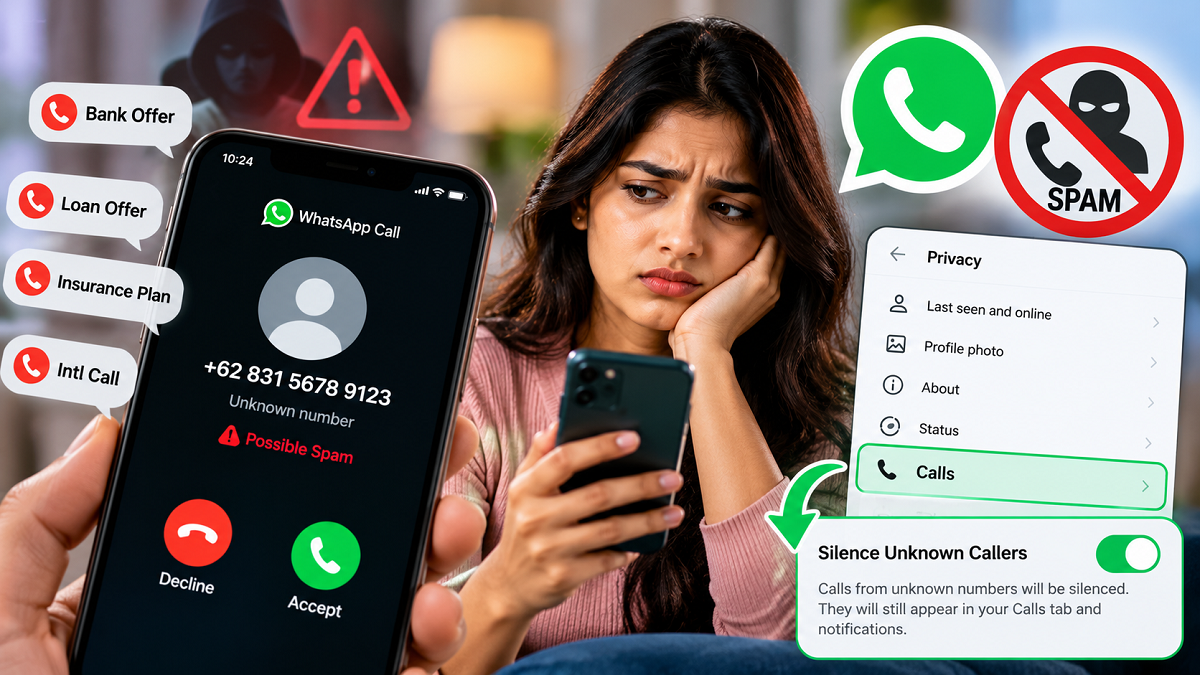
Unwanted WhatsApp calls from unknown numbers can be frustrating, especially when they arrive repeatedly during work, meetings or late at night. Some users may also receive suspicious calls from unfamiliar international numbers or people promoting unsolicited services.
Blocking every unknown number individually is not always practical. Fortunately, WhatsApp provides a privacy feature called Silence Unknown Callers, which can prevent calls from unfamiliar numbers from ringing on your phone.
The feature does not necessarily block the caller. Instead, qualifying calls from unknown numbers are silenced while remaining visible in WhatsApp, allowing users to review them later.
For people regularly dealing with unwanted calls, this simple privacy setting can make WhatsApp considerably less disruptive.
What Is WhatsApp's Silence Unknown Callers Feature?
As its name suggests, Silence Unknown Callers is designed to automatically silence incoming WhatsApp calls from people you do not know.
When the feature is enabled, calls identified as coming from unknown callers will not ring normally on the device. However, the calls can still appear in WhatsApp's call list, meaning users can check who tried to contact them and decide whether to respond.
This is particularly useful because not every unfamiliar caller is necessarily spam.
For example, someone may receive a legitimate WhatsApp call from a delivery person, business contact or another individual whose number has not yet been saved. Since the call remains visible in the call history, the user can review it later.
Why You May Want to Turn It On
One of the biggest advantages is fewer interruptions.
An unknown WhatsApp call arriving during an important meeting, while studying or when sleeping can be distracting. Enabling the feature can reduce interruptions from such callers without requiring users to manually block numbers one by one.
It can also add another layer of protection against unwanted contact.
However, users should not assume that enabling the setting provides complete protection against scams or cybercrime. The feature primarily silences qualifying unknown calls; it does not guarantee that every fraudulent caller will be identified or prevented from contacting you through other methods.
Users should continue to be cautious about suspicious calls and messages.
How to Enable Silence Unknown Callers on WhatsApp
The feature can be turned on directly through WhatsApp's privacy settings.
Open WhatsApp on your smartphone and go to Settings. Depending on your phone, you may need to tap the three-dot menu first to reach Settings.
Next, select Privacy.
Scroll through the privacy options until you find Calls. Open it and look for the setting labelled Silence Unknown Callers.
Switch the toggle ON.
Once enabled, eligible WhatsApp calls from unknown callers will be silenced rather than ringing normally.
The exact menu appearance can differ slightly depending on whether you are using Android or iPhone and which version of WhatsApp is installed.
Will You Completely Miss an Important Call?
Not necessarily.
An important benefit of this feature is that silencing an unknown caller is different from permanently blocking that number.
Silenced calls can still be recorded in WhatsApp's Calls tab, allowing users to check them later. This means you can review unfamiliar numbers and return a call if you recognise the person or believe it may have been important.
This approach offers a middle ground between accepting every incoming call and blocking every unfamiliar number.
Can It Help With International Spam Calls?
The feature may be particularly useful for people who frequently receive unexpected WhatsApp calls from unfamiliar domestic or international numbers.
If you receive a suspicious call, avoid sharing OTPs, banking information, UPI PINs, passwords or other sensitive personal details.
Users should also avoid clicking unknown links sent after suspicious calls. If a number appears fraudulent or repeatedly contacts you, WhatsApp's block and report options can provide additional controls.
Silencing and Blocking Are Different
Users should understand an important distinction.
Silence Unknown Callers does not work exactly like blocking a contact.
Silencing primarily prevents qualifying unknown calls from disturbing you with normal ringing. Blocking, on the other hand, places stronger restrictions on interaction with a particular number.
Therefore, if one specific account repeatedly sends suspicious messages or makes unwanted calls, users can consider blocking and reporting that account separately.
Keep WhatsApp Updated
If you cannot find the Silence Unknown Callers setting, check whether WhatsApp is updated to the latest version available for your smartphone.
After updating the app, return to Settings > Privacy > Calls and check for the option again.
Menu names and placement may vary slightly across devices and app versions.
A Simple Setting for Fewer Unwanted Interruptions
For WhatsApp users who regularly receive calls from unfamiliar numbers, Silence Unknown Callers provides a convenient way to reduce interruptions without immediately blocking every caller.
Once enabled, qualifying unknown calls can be silenced while remaining visible in the call history for later review.
It is a useful privacy tool, but it should be combined with basic digital-safety habits. Never disclose passwords, OTPs, card information or UPI credentials to unknown callers, and use WhatsApp's block and report tools when a number appears suspicious.
With a small change in WhatsApp's privacy settings, users can gain greater control over who gets to interrupt them with unexpected calls.