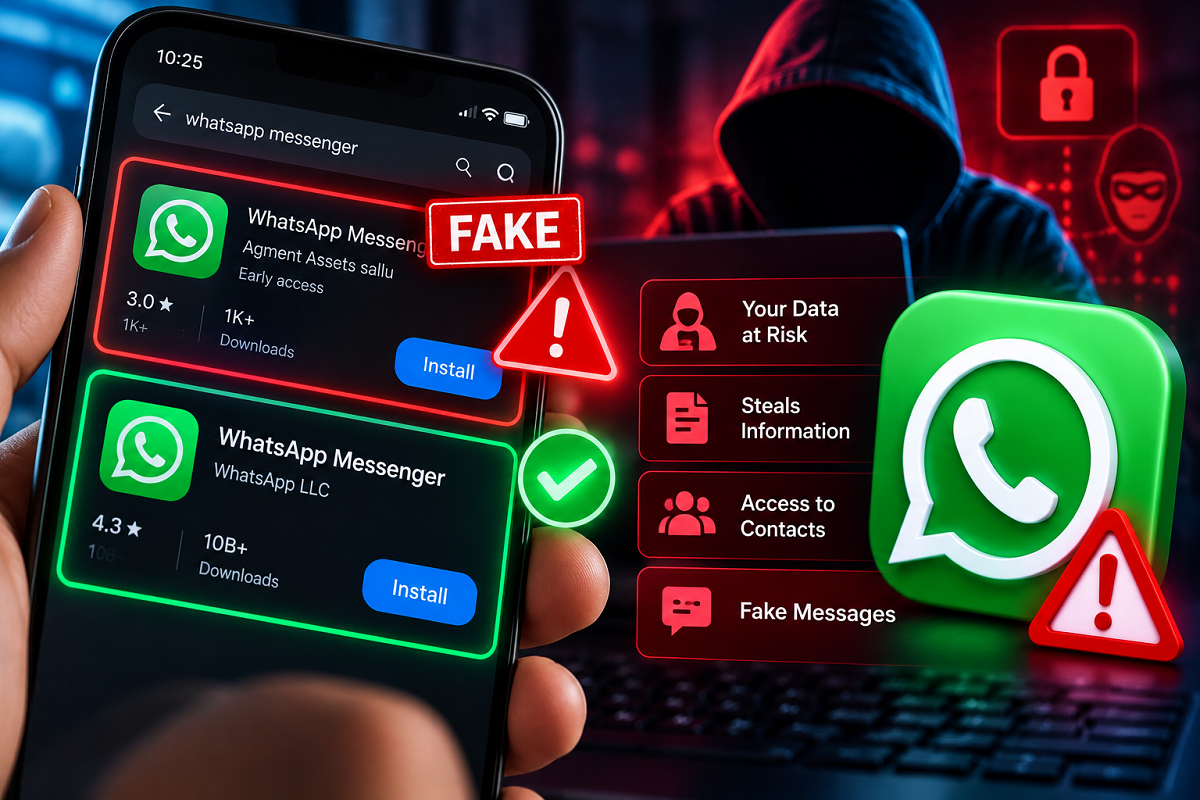
WhatsApp Security Alert 2026: Millions of people rely on WhatsApp every day for personal conversations, office communication, video calls and sharing important documents. However, a recently reported fake application using the name "WhatsApp Messenger" has raised concerns about the safety of users downloading messaging apps from online stores.
According to reports circulating in October 2026, a suspicious application appeared on the Google Play Store with branding that closely resembled the official WhatsApp app.
The incident attracted attention after a Reddit user highlighted the questionable listing. Technology publications, including Android Authority and The Verge, subsequently reported on the issue.
The case serves as a reminder that users should carefully verify an application's developer and other details before installing it, even when it appears in a familiar app marketplace.
Here is what users should know about the reported fake WhatsApp application, how to identify the official version and what to do if a suspicious app is already installed.
Fake WhatsApp Messenger App Reportedly Appeared on Google Play Store
The suspicious application was reportedly listed under the name "WhatsApp Messenger," making it easy to confuse with the legitimate messaging service.
According to the reports, the application was published by a developer identified as "Agment Assets sallu."
The listing allegedly used an icon, screenshots and descriptions similar to those associated with the genuine WhatsApp application.
Such imitation techniques can mislead users who rely mainly on an app's appearance when deciding what to download.
A person searching for WhatsApp might recognise the familiar green messaging icon and install the application without examining the publisher's identity.
However, an app's name and icon are not sufficient evidence that it belongs to the company it claims to represent.
The exact functionality and potential risks of the reported imitation app have not been independently established here, so users should not assume that it necessarily stole information or infected devices.
Nevertheless, misleading app listings deserve attention because they can expose users to security and privacy risks.
How Did a Fake WhatsApp App Reach the Play Store?
The reported incident has raised questions about how an application resembling a major messaging platform could appear in Google's app marketplace.
One possibility discussed in the reports was that the suspicious listing used an early-access distribution mechanism.
Early-access applications can have different visibility and feedback characteristics compared with established public releases.
However, the claim that this particular app exploited the Early Access programme should be treated as a reported possibility rather than a confirmed explanation.
Google Play has policies and security screening mechanisms intended to identify harmful or deceptive applications, but no automated review system can guarantee that every misleading listing will be detected immediately.
Users therefore benefit from carrying out a few basic checks before installing unfamiliar software.
How to Identify the Real WhatsApp Messenger App
The genuine WhatsApp Messenger application is associated with WhatsApp LLC, part of Meta's family of services.
Before downloading the app on an Android phone, users should verify the publisher's identity.
The official WhatsApp application has an established Play Store presence and a very large installation base.
A newly created application with an unfamiliar developer name should be treated cautiously, particularly if it claims to be a widely used service.
Here are the most important checks.
1. Check the Developer's Name
Open the application's listing in the Google Play Store and look at the developer information.
The genuine WhatsApp Messenger listing identifies WhatsApp LLC as the developer.
If an application uses the WhatsApp name but displays an unrelated publisher, avoid installing it.
The developer name is one of the clearest indicators users can check, although sophisticated impersonation attempts may imitate other details as well.
2. Examine Downloads and Reviews
The official WhatsApp application has an extensive download history and a large number of user reviews.
A suspicious imitation may have far fewer installations or little publicly available feedback.
However, download figures and ratings should be considered supporting indicators rather than absolute proof of legitimacy.
Fake reviews can be manipulated, and genuine new applications may naturally have limited feedback.
Always combine these checks with developer verification.
3. Do Not Trust the App Icon Alone
Cybercriminals and impersonators may copy the appearance of popular applications to create a false sense of familiarity.
A green icon featuring a telephone symbol does not automatically mean an application is genuine WhatsApp.
Similarly, screenshots that resemble the real messaging interface are not enough to establish authenticity.
Review the publisher and listing details before proceeding.
4. Be Careful With Sponsored Search Results
Some app marketplaces and search services display sponsored placements.
A prominent position in search results should not be treated as proof that an application is the official version.
Users should carefully check the destination before installing any software promoted through an advertisement.
Avoid downloading messaging applications through unfamiliar links shared in social media posts, messages or pop-up advertisements.
5. Use Official Download Channels
The safest approach is to begin with WhatsApp's verified website or the official listing in a trusted app store.
Avoid installing modified WhatsApp applications, unofficial APK files or software claiming to provide special messaging features without reliable verification.
Third-party versions may not provide the same security protections as the official service.
How to Check Which WhatsApp App Is Installed on Your Phone
Android users can review an installed application's details through their phone settings.
Follow these steps:
- Open Settings on your Android smartphone.
- Select Apps or App Management, depending on the device.
- Find and open WhatsApp.
- Review the application details and permissions.
- Use the available app-store information to verify that it corresponds to the official WhatsApp Messenger listing.
On many Android phones, users can also open the Google Play Store, search for WhatsApp Messenger and check whether the official listing shows the app as installed.
The exact menus may vary depending on the smartphone manufacturer and Android version.
If anything appears suspicious, avoid entering passwords, verification codes or personal information until the application's authenticity has been checked.
What Should You Do If You Installed a Fake WhatsApp App?
If you believe you have installed a fraudulent application, taking prompt action can reduce potential risks.
Uninstall the suspicious app: Remove the application from your phone after identifying it as an imitation. If you need to report suspected fraud, consider preserving relevant screenshots of its listing and permissions first.
Review app permissions: Check whether the application received access to contacts, SMS messages, files, notifications, the microphone or other sensitive functions. Revoke unnecessary permissions.
Run a security scan: Use Google Play Protect or another reputable mobile security solution to check for potentially harmful applications.
Secure your WhatsApp account: If you entered a WhatsApp verification code into a suspicious app, open the genuine WhatsApp application and follow the account recovery or registration process where necessary.
Enable two-step verification: WhatsApp offers an additional security feature that can help protect account registration.
Check linked devices: Review the Linked Devices section in WhatsApp and log out of any sessions you do not recognise.
Protect other accounts: If you shared passwords or financial information, change affected credentials through official services and contact your bank if necessary.
If you suspect financial fraud in India, promptly contact your bank and report the incident through the appropriate cybercrime reporting channels.
Can Fake WhatsApp Apps Steal Personal Information?
A malicious imitation application could potentially attempt to collect sensitive information, depending on how it is designed and which permissions it receives.
Possible risks from harmful apps can include credential theft, unwanted data collection, deceptive advertisements or attempts to trick users into sharing verification codes.
However, these are general risks associated with malicious applications.
They should not be interpreted as confirmed findings about the specific app mentioned in the October 2026 reports.
The actual risk to a user depends on what the application does, which permissions were granted and whether any sensitive information was shared.
This is why checking app authenticity before installation remains important.
Why WhatsApp Users Should Take App Security Seriously
WhatsApp is widely used for conversations involving family members, colleagues, customers and businesses.
Many users also exchange photographs, documents and other personal information through the service.
An application impersonating WhatsApp can therefore create confusion and potentially encourage users to disclose information they would otherwise keep private.
Even experienced smartphone users can be misled by convincing icons and familiar-looking descriptions.
Simple habits, including verifying developer names, reviewing permissions and avoiding unfamiliar download links, can help reduce exposure to such threats.
Final Thoughts
The reported appearance of a fake WhatsApp Messenger listing on Google Play highlights the importance of checking applications before installing them.
According to the October 2026 reports, the suspicious app used branding resembling WhatsApp but was associated with a developer other than WhatsApp LLC.
Although the precise behaviour of that application has not been established here, the incident offers a useful reminder about mobile security.
The key takeaway: Before downloading WhatsApp, verify the developer, examine the app listing and use official distribution channels. If you suspect that you have installed an imitation, remove it, review permissions and secure your accounts promptly.
Taking these precautions can help protect personal information and reduce the risk of falling victim to deceptive applications.