Instagram has evolved far beyond being an app for simply uploading photos and videos. Over the years, Meta has added several communication-focused features that allow people to interact with friends, followers and other accounts without necessarily publishing a permanent post.
One such feature is Instagram Notes.
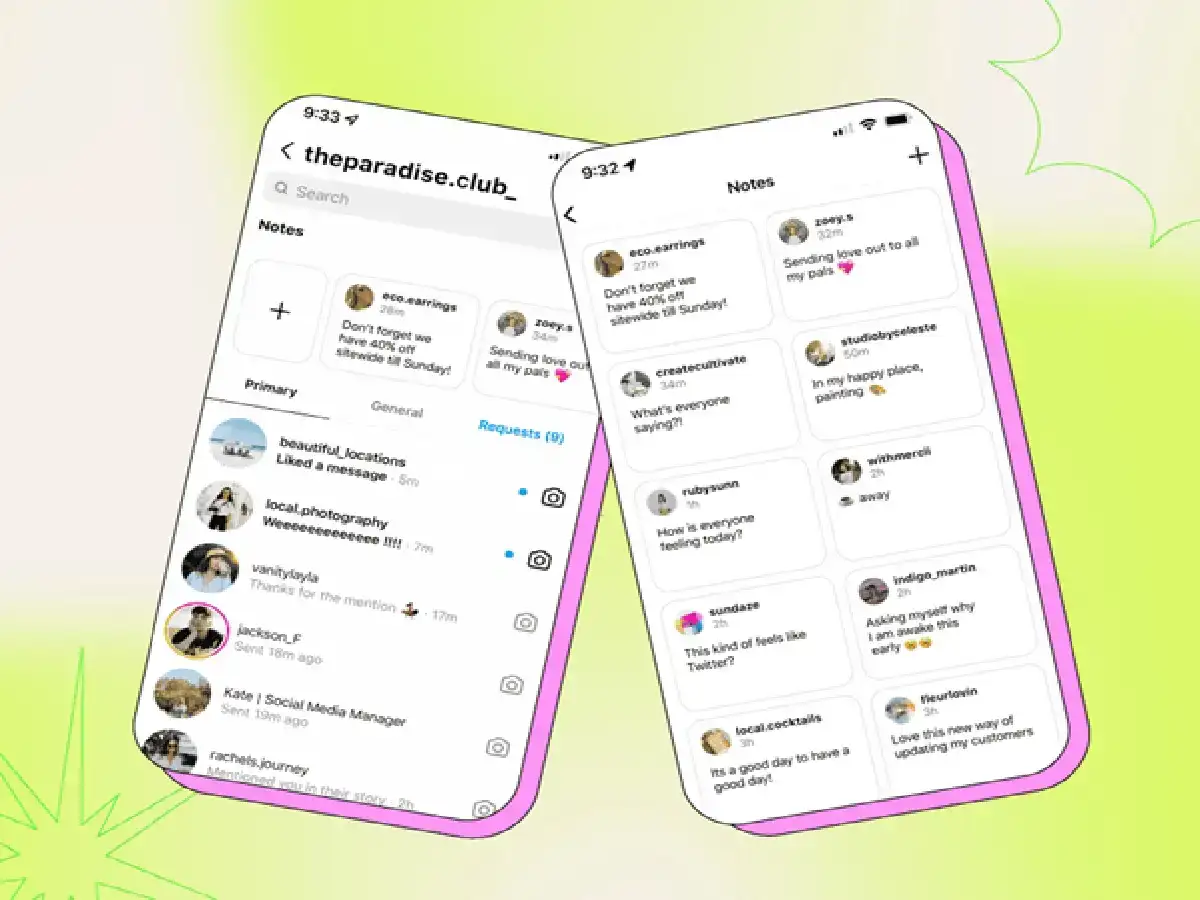
Notes are designed for quick, lightweight updates that appear around the messaging area of Instagram. Instead of creating a full post, Story or Reel whenever you have something small to share, you can use a Note to communicate a short thought, question or update with your selected audience.
Although the feature looks simple, using it creatively can make Instagram conversations more engaging. From asking friends about weekend plans to sharing a quick recommendation, Notes can be useful in several everyday situations.
Here's what Instagram Notes are and how you can make better use of them.
What Are Instagram Notes?
Instagram Notes are short updates that users can share with an eligible audience through the app's messaging experience.
Unlike regular feed posts, Notes are meant to be temporary and casual. They are useful when you want to say something quickly without creating a permanent piece of content for your profile.
Depending on the features currently available to your account and region, Instagram may provide text and additional creative options for Notes.
Their temporary nature makes them suitable for spontaneous thoughts, questions, recommendations and other short updates.
Don't Limit Your Notes to 'Hello' or 'Good Morning'
A common mistake is treating Notes as nothing more than a space for greetings.
While there's nothing wrong with posting "Good Morning," you can get considerably more value from the feature by using it to start conversations.
For instance, you could ask friends whether they're free over the weekend, request a movie recommendation, mention a song you've been listening to or ask followers for an opinion on something.
The key is to keep the message short enough that people can understand it immediately.
Instead of simply writing "Hello," you could post something like "Any movie recommendations for tonight?" A question naturally gives people a reason to respond and can turn a small Note into a conversation.
Use Notes to Make Quick Plans With Friends
Instagram is frequently used to coordinate plans, especially among friends who already communicate through DMs.
Notes can provide a simple way of checking who might be interested in doing something.
For example, you could post a short update asking who is available for coffee, a movie, dinner or another activity.
People who see the Note and are interested can respond, after which the conversation can continue privately through direct messages.
This can be more convenient than individually messaging several people when you're simply checking who's available.
Share Recommendations Without Creating a Full Post
Found a great movie, song, café or book but don't feel like creating an entire Story or feed post about it?
A Note can work well for quick recommendations.
Similarly, you can turn the idea around and use Notes to ask other people for suggestions. A simple question about what to watch, listen to or read can encourage replies from people in your Instagram circle.
This keeps the interaction casual while still helping you stay connected.
Stay Active Without Posting Stories or Reels Constantly
Not everyone wants to upload content every day.
Creating Reels can take time, and even posting Stories regularly may feel unnecessary for users who primarily use Instagram to keep in touch with friends.
Notes provide a lower-effort alternative.
A brief update can show that you're active and open to conversation without requiring you to record a video, select a photograph or create a polished post.
This makes the feature particularly useful for users who enjoy Instagram's social side but don't necessarily want to become frequent content creators.
Short and Clear Notes Can Work Better
Because Notes are designed for brief communication, long or confusing messages can reduce their effectiveness.
Try to communicate one clear thought at a time.
Questions, short observations and simple calls for recommendations can work naturally in this format. You don't need to make every Note clever or attention-grabbing.
For example, asking "Best series to start this weekend?" communicates the purpose immediately and makes responding easy.
Check Who Can See Your Note
Before publishing a Note, pay attention to its audience.
Instagram provides audience controls for Notes, although the exact options and interface may change as the app receives updates.
Always check which audience you have selected before sharing.
This is especially important when your Note refers to personal plans, locations or information that you wouldn't want visible to a wider group of people.
Avoid Sharing Sensitive Information
A temporary update shouldn't be treated as completely private simply because it disappears after a limited period.
Avoid sharing passwords, OTPs, banking information, private contact details, confidential workplace information or other sensitive data through Notes.
You should also think carefully before sharing real-time location details or personal schedules with a broad audience.
If the information is private, a direct conversation with a trusted person is generally more appropriate.
Instagram Notes Can Be a Simple Conversation Starter
Instagram Notes may appear to be a small feature compared with Reels, Stories and regular posts, but their simplicity is exactly what makes them useful.
They can help you ask quick questions, seek recommendations, share small updates, make plans and stay connected without producing a full piece of content.
Instead of using Notes only for routine greetings, try treating them as short conversation starters. Keep your message clear, choose the right audience and avoid revealing sensitive information.
Used thoughtfully, Instagram Notes can become one of the easiest ways to maintain casual conversations with friends and followers without constantly posting to your main Instagram profile.