Fake and spam followers have become a growing concern for users on Instagram. These bot accounts may inflate follower counts, but they often harm engagement, reduce credibility, and even pose security risks.
To tackle this issue, Instagram has introduced built-in tools that help users easily identify and remove suspicious accounts. Whether you want to clean up your follower list or protect your profile from spam, here’s a complete guide to removing fake followers quickly and effectively.
Why Fake Followers Are a Problem
At first glance, having a large number of followers might seem impressive. However, fake or bot accounts can negatively impact your profile in several ways:
- Lower engagement rates (likes, comments, shares)
- Reduced visibility due to algorithm impact
- Increased risk of scams or phishing attempts
- Damage to personal or brand credibility
That’s why regularly cleaning your follower list is important for maintaining a healthy Instagram account.
How to Identify Spam Followers on Instagram
Instagram has introduced a smart feature that automatically detects suspicious accounts.
“Potential Spam” Feature
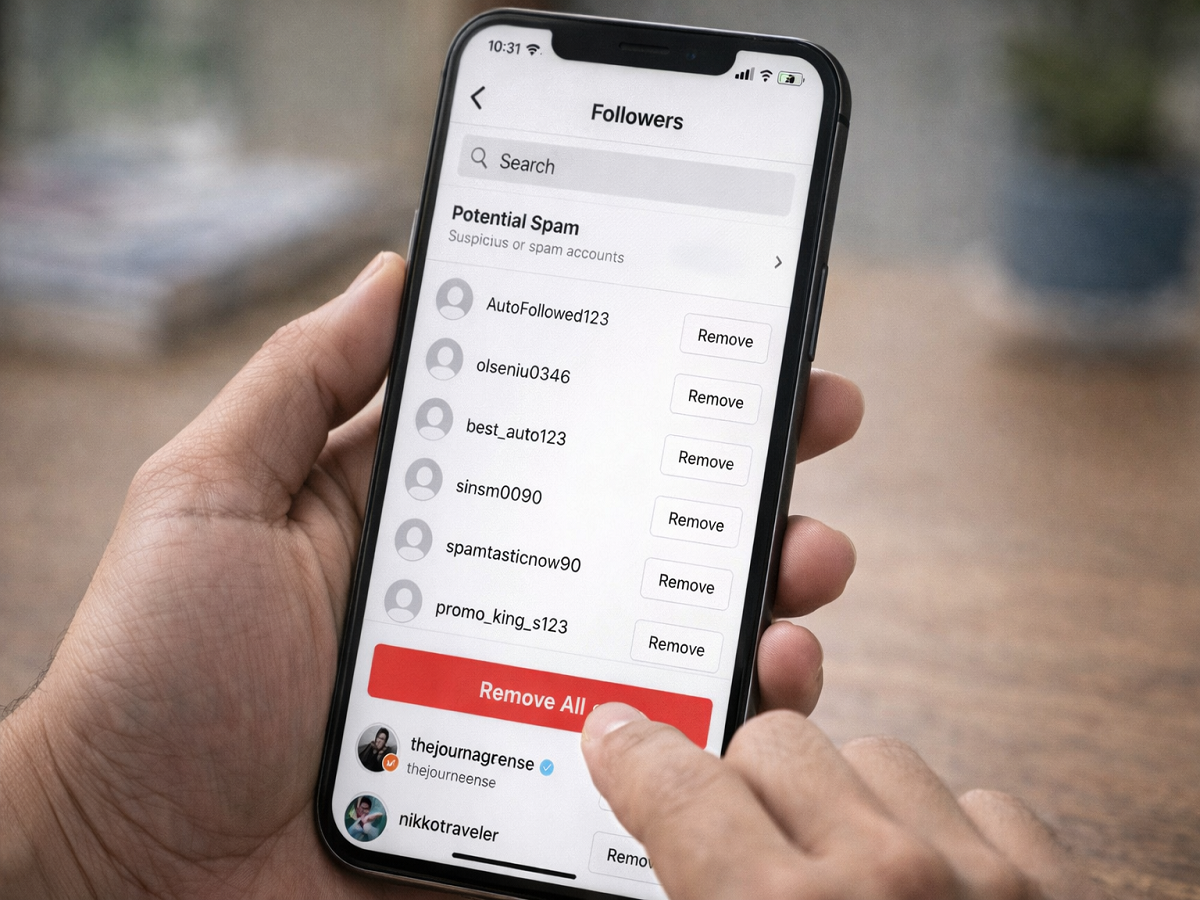
When you open your followers list, you may see a section called “Potential Spam.” This list includes accounts flagged by Instagram’s system as possibly fake or suspicious.
What You Can Do:
- Review profiles before taking action
- Confirm if the account is genuine
- Remove if it appears fake or irrelevant
This feature is especially useful if your followers suddenly increase or you receive random follow requests.
Remove All Spam Followers in One Click
Instagram also allows users to delete multiple spam accounts at once.
Steps to Remove All Spam Followers:
- Open Instagram
- Go to your Profile
- Tap on Followers
- Open the “Potential Spam” section
- Tap on “Remove All” or “Remove All Spam Followers”
- Confirm your action
Once confirmed, all flagged accounts will be removed instantly.
Important:
- Removed users won’t receive any notification
- Your privacy remains fully protected
Enable Spam Filter for Better Protection
To avoid future issues, you can enable Instagram’s spam filter feature.
Benefits:
- Automatically detects suspicious accounts
- Reduces fake follower requests
- Keeps your account safer
You can turn this setting on or off anytime from your account privacy settings.
How to Remove a Single Follower Manually
If you want to remove a specific follower, you can do it manually in just a few taps.
Steps:
- Go to your Profile
- Tap on Followers
- Find the account you want to remove
- Tap “Remove” next to the username
- Confirm
This method is useful when you want to remove a particular user without affecting others.
Final Thoughts
Fake followers may seem harmless, but they can quietly damage your account’s performance and security. Thankfully, Instagram now provides simple tools to identify and remove spam accounts quickly.
By using the “Potential Spam” feature and bulk removal options, you can keep your follower list clean, improve engagement, and maintain a more authentic presence online.
If you haven’t checked your followers recently, now is the perfect time to clean up your account and stay ahead of spam.